
Understanding the Carousel Format Instagram Offers
The carousel format Instagram provides has become one of the most effective ways to share content on the platform. Instead of posting a single image, users can add multiple slides within one post, allowing viewers to swipe through a sequence of images or videos. This feature transforms a regular post into a storytelling experience where each slide contributes to a larger message.
Using a carousel image Instagram post allows creators to explain ideas in more depth. A single image might capture attention, but a carousel gives the opportunity to educate, inspire, or guide an audience step by step. Because viewers interact by swiping, the carousel format naturally encourages longer engagement with the content.
Why Carousel Images on Instagram Increase Engagement
Carousel images on Instagram tend to perform better than single-image posts because they keep users engaged for a longer period of time. When someone begins swiping through slides, they are already interacting with the content, which increases the chances that they will stay until the final slide.
Read More: Importance Of Social Media In Online Reputation Management
This extended interaction helps signal to Instagram’s algorithm that the post is valuable and interesting. As a result, the platform is more likely to show the content to a wider audience. A well-crafted carousel for Instagram can therefore improve visibility while also giving creators more space to deliver meaningful content.
In addition, the multiple-slide format allows brands and creators to present information in a structured and visually appealing way. Instead of overwhelming viewers with too much information in one image, each slide can focus on a specific point.
Building a Strong Carousel Instagram Design
Creating an effective carousel Instagram design requires thoughtful planning and visual consistency. Each slide should feel connected to the others so that the viewer experiences a smooth transition from one slide to the next. Consistent fonts, colors, and design elements help create a professional look that reflects your brand identity.
The first slide of a carousel image Instagram post is particularly important because it acts as the hook. It should immediately capture attention and encourage viewers to swipe. Once the audience begins interacting with the carousel, the remaining slides should deliver clear and valuable content that keeps them engaged.
A strong design approach ensures that carousel images on Instagram are both visually attractive and easy to understand.
Using Carousel Images to Tell a Compelling Story
One of the greatest strengths of a carousel in Instagram is its ability to support storytelling. Instead of trying to communicate everything in a single image, creators can divide their message across several slides. This approach allows the story to unfold naturally, making the content more engaging and memorable.
For example, a creator might start with a question or problem on the first slide, explain the background in the following slides, and then present a solution or insight toward the end of the sequence. This method keeps viewers curious about what comes next and encourages them to continue swiping through the entire carousel.
Storytelling also helps build a stronger emotional connection with the audience. When viewers feel involved in the narrative, they are more likely to remember the content and interact with it.
Structuring Carousel Images on Instagram for Maximum Impact
A well-structured carousel format Instagram post guides viewers through a logical flow of information. Each slide should serve a clear purpose while contributing to the overall message. When the structure is organized properly, audiences can easily follow the content and absorb the information being shared.
Many successful creators structure their carousel for Instagram posts like a mini presentation. The opening slide captures attention, the middle slides provide value or insights, and the final slide encourages engagement such as commenting, saving, or sharing the post.
This structured approach helps ensure that carousel images on Instagram deliver both clarity and impact.
Saving Time with AI-Powered Carousel Creation
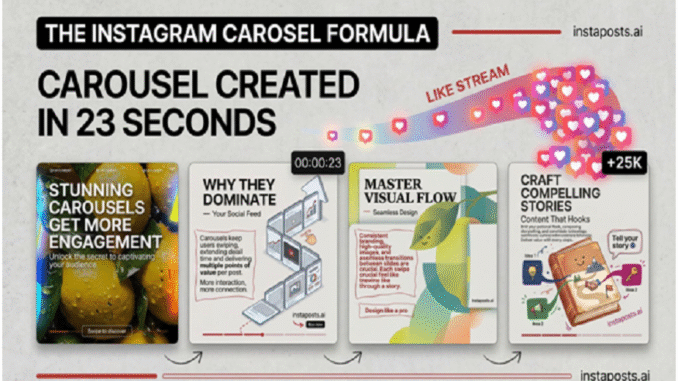
Creating a professional carousel Instagram design used to require significant time and design expertise. Today, advanced AI tools make it possible to generate complete carousel sequences quickly and efficiently. These tools can automatically create layouts, organize slide content, and maintain visual consistency throughout the design.
With AI support, creators can produce high-quality carousel image Instagram posts without spending hours designing each slide. This technology allows marketers, influencers, and businesses to focus more on ideas and storytelling rather than technical design work.
AI-powered design tools are transforming how carousel images on Instagram are created, making it easier than ever to produce engaging visual content at scale.
Final Thoughts
The carousel format Instagram introduced has changed the way people share information and tell stories on the platform. By combining multiple slides within a single post, creators can deliver deeper insights, build stronger narratives, and encourage more meaningful audience interaction.
Read More: How You Can Use Sites for Facebook Page Like Benefits
Instaposts.ai is an automated ai carousel maker that creates high-design carousels in seconds. Our killer feature is total automation. While other tools make you build slide by slide, we generate the entire sequence for you instantly.
What we do: Transform ideas into professional carousels using text to carousel and blog to carousel tech.
Who it is for: It is the perfect ai carousel generator for coaches, creators, and small business owners.
Problem we solve: We eliminate the design bottleneck and ensure your instagram carousel size and style are always perfect.
Stop struggling with design and explore our 100+ templates to start growing your audience today.
Leave a Reply
You must be logged in to post a comment.